AI writes code faster than any human. But your agents are blind — they can’t see what they built, can’t watch what users hit, and start from zero every session. Only Fullstory Fullcapture turns on the optical nerve of the agentic SDLC.
Fullcapture
The optical nerve
→
Customer Agent MCP
CX activations
→
Fullstory MCP
The data
→
Subtext
Closed-loop QA
The Problem
AI can write code. It can’t see the app.
Your coding agents are fast at typing and slow at understanding. They can’t watch what users hit, can’t verify their fix against a running app, and start from scratch every session. The bottleneck isn’t the code. It’s the feedback.
Agents can’t check their own work.
They write code and hope it matches intent. You reload, click through, describe what’s wrong in chat.
Every session starts from zero.
No memory of your app. Re-discover structure, guess at components, burn tokens on element hunting.
Production bugs wait for humans.
The agent that wrote the code can’t go back and watch what went wrong. It waits for you to investigate.
The bottleneck isn’t the code. It’s the feedback loop. Close that loop and agentic engineering actually ships.
Step 1 — The Foundation
Fullcapture. The optical nerve.
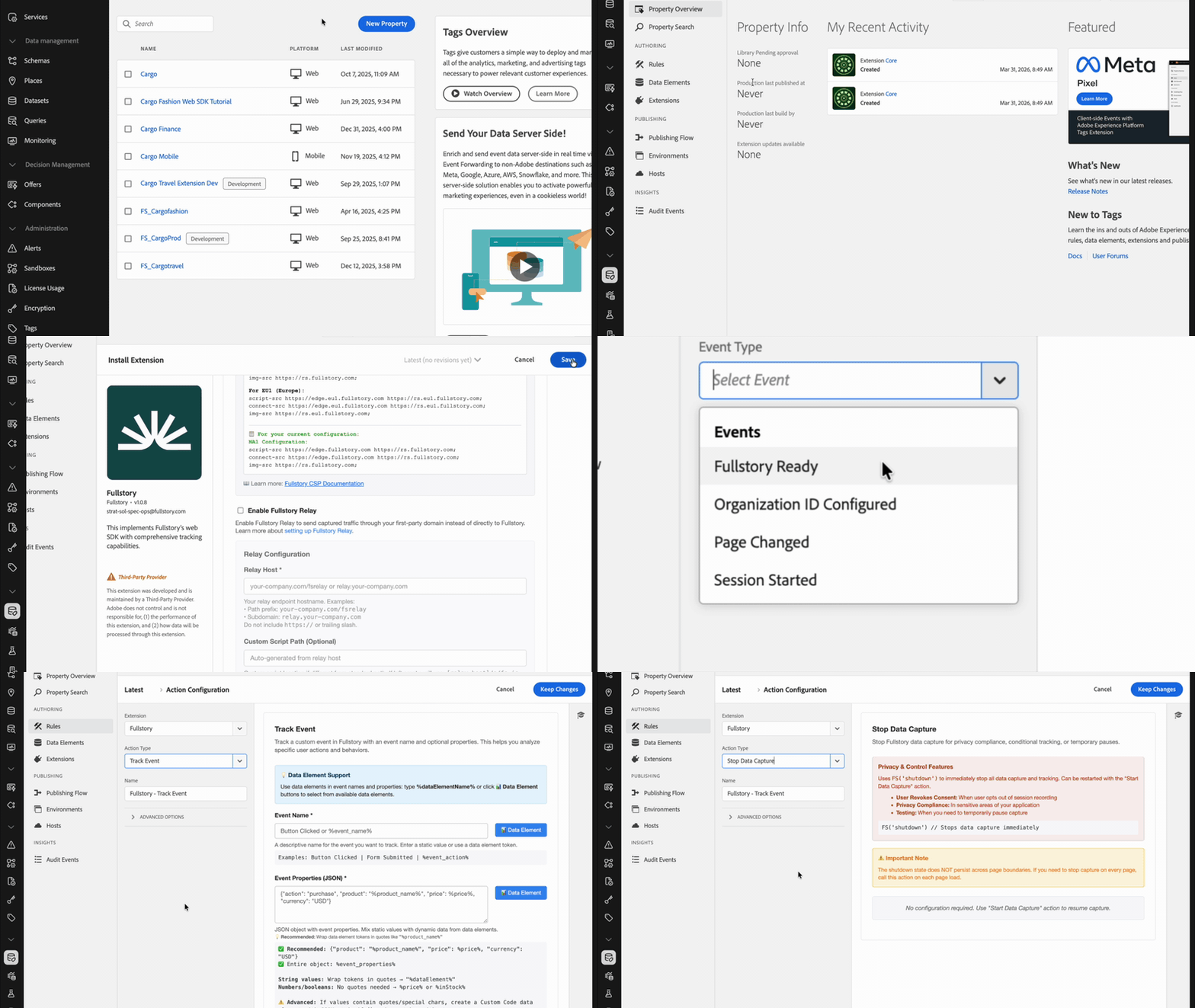
Only Fullstory captures every click, input, navigation, network call, error, and frustration signal — automatically. No tagging. No sampling. No missed events. This is the sensory input every agent downstream depends on.
This is what makes everything else possible. Customer Agent MCP, Fullstory MCP, and Subtext all read from the same high-fidelity stream. No capture, no sight. Only Fullstory does this.
Install → Configure org ID → Publish. Fullcapture is live.
9
Tag Actions
4
Events
8
Data Elements
MCP Ecosystem — 1 of 3
Customer Agent MCP. Fullstory context, anywhere your agents work.
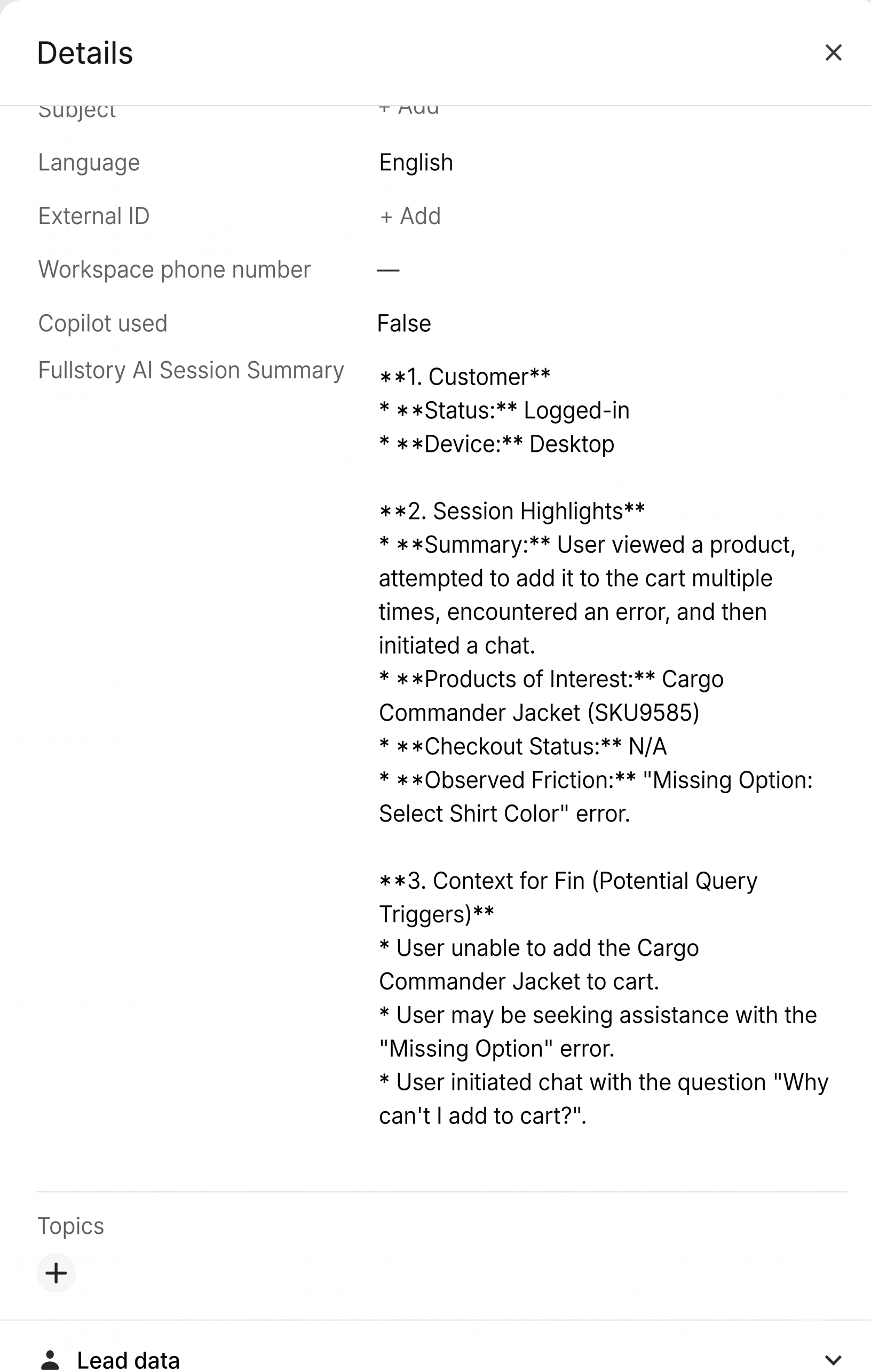
A standalone MCP server that delivers behavioral truth to any external agent platform — Intercom Fin, Zendesk AI, Salesforce Einstein. Your CX agents answer with session context instead of ticket text.
Part of Fullstory Anywhere: Activation. Two tools. Simple contract. Every external agent gets the same behavioral signal your internal teams rely on.
get_session_summaryget_context
Agent view · Intercom
Human agents see the session summary inline on the ticket.
Customer view · Fin
The bot resolves with session context — no human needed.
Step 2 — Investigate
Your AI now speaks Fullstory.
The Fullstory MCP connects any AI coding assistant — Claude Code, Cursor, Copilot — directly to your captured user behavior. Query frustration signals, pull session replays, diagnose real issues without leaving your IDE.
Plugs into the Adobe MCP ecosystem. Fullstory is the behavioral sensor. marketo-mcp.adobe.io and AJO MCP are the action layer. Claude reads the session, finds the broken form field, calls Marketo MCP to fix it. 30-minute loop — sense, diagnose, act.
Claude Code — MCP Ecosystemsense → diagnose → act
// Fullstory MCP — the eyes (behavioral signal)>Why are Demo Request submissions down 30%? Claude → fullstory.get_opportunities() Claude → fullstory.get_sessions(segment: "form_abandon") Root cause: rage-clicks on "Company" field, 62% of drops// Marketo MCP — the hands (marketing action) Claude → marketo.update_form(id: 12, remove: "Company") Claude → marketo.clone_program("Q2 Demo Request" → "Q3")// Fullstory MCP — validate the fix Claude → fullstory.get_sessions(after: now) Submissions up 41%. Rage-clicks gone.// 30-minute loop. No ticket. No sprint.
Fullstory MCP
The eyes
Marketo MCP
The hands
AJO MCP
The journey
Live Agent Session
Watch an analyst agent investigate a vague ask.
One prompt, no tool names, no spec. The agent scopes, investigates, and ships — and we'll pause along the way to explain what it's doing and how it's using the Fullstory MCP.
Playing — press → to skip
0:13 — Clarifying the ask
Humans don't name tools.
Notice the prompt didn't say “use the Fullstory MCP.” Nobody talks that way. Claude asks clarifying questions about the analysis first — audience, performance metric, time window — so it can pick the right data source on its own.
→
or click to continue
0:35 — Constraining the analysis
Shape the analysis. Not the call.
My answers are atypical on purpose. UTM-tagged campaigns. Conversion defined as reaching the product page — not purchase. And it's not raw performance, it's performance against a prior-period baseline.
Analytical frame, not API calls. Claude carries these constraints through the whole investigation — and still picks the tools itself.
→
or click to continue
0:58 — Bearings, plan, execute
The agent gets its own bearings.
Loads the general-analysis skill — a structured playbook. Pulls every defined page and element to see what's in scope. Cross-references the org's own names for pages, elements, and events before it plans.
Then parallel analysis across multiple metrics and time windows. Finally it publishes through your client-side design system — branded, marketing-approved. How reports look stays in your control.
→
or click to continue
1:31 — Verifiable work
Claude leaves receipts.
Those aren't text citations — they're live links. Each one points to a real object Claude built inside your Fullstory org: a metric, a segment, a page.
Click through any of them to verify the work. The audit trail is live, not narrated.
→
or click to continue
2:36 — What shipped
One vague ask. Seven-part analysis.
A comparative breakdown of UTM campaign performance — friction and errors that hurt visitors, with the fixes that unlock funnel throughput.
Plus companion speaker notes drawn from the depth of behavior Claude actually analyzed — not summarized, analyzed. All of it grounded in Fullstory Fullcapture.
→
see what shipped
What the agent just did
From vague ask to shipped report — end to end.
One prompt: “prepare a report on the performance of our current marketing campaigns.” No spec. No data handoff. The agent used Fullstory MCP to see the app, investigate behavior, surface the bugs hurting conversion, and produce both a CMO-ready report and the field guide that teaches the team to reproduce the workflow.
Scoped the ask.
Clarified audience (CMO), data source (Fullstory), and deliverable shape before touching code.
Discovered active campaigns.
Queried Fullstory MCP to identify in-flight UTM campaigns and benchmark performance.
Caught bugs & friction.
Surfaced real UX issues suppressing campaign conversion — problems no dashboard would have flagged.
Shipped two artifacts.
A board-ready report and a field guide so the next analyst can reproduce it from scratch.
This is the compound return. Fullcapture gave the agent signal. Fullstory MCP gave it eyes. The output is a real artifact, shipped in a single session — not a research doc.
Step 3 — Validate
Subtext. The QA engineer in the chair next to you.
Your agent reproduces the bug via a live browser tunnel, writes the fix, validates against the running app, and attaches a recorded session as definitive before-and-after proof on the PR.
subtext live — tunnel from GCP to your localhost. No VM, no screen share.
Sightmap-enriched snapshots — agents navigate by component name, not fragile CSS selectors.
Session recording on every run — attach a replay to the PR. No "LGTM." Proof.
The end of PR slop. Agents stop shipping code that looks right and breaks the experience. They ship validated outcomes.
The share button is broken. 968 users can't share.
An SVG <line> inside the button is intercepting pointer events — users click, nothing happens. Affects 28% of ProductPage users. The fix is one CSS rule; the hard part is knowing it's happening at all.
Subtext picks this one up → One CSS rule sounds trivial. Watch the agent reproduce it, fix it, validate against the live app, and attach recorded proof — before a human ever reviews.
Live Subtext Session
Tunnel in. Collaborate with the agent in your live app.
The Subtext UI establishes a tunnel between your locally-running site and your agent. You explore the experience together — leaving and receiving comments as you go.
Playing — press → to skip
0:16 — Invisible bug
The bug doesn't show up in the UI.
The agent explores the Subtext sightmap, recognizes this one is invisible to the user, and offers an example session I can open to watch the dead-click happen.
→
or click to continue
0:45 — Human in the loop
The agent finds the selector. I verify.
The agent names the exact selector drawing the dead-click in Fullstory. I'm not yet convinced — so I inspect the page and leave a comment asking for confirmation. The agent sees the comment and responds.
→
or click to continue
1:26 — Fix & validate
Code change, confirmed in the running app.
The agent makes the code change. I confirm visually — the share button clicks through. No rebuild. No PR round-trip. Just proof in the live app.
→
or click to continue
1:56 — Now extend it
Left turn: ship a new intent.
Beyond the fix — I point the agent at a new goal: swap the icon and link the button to the Fullstory Subtext marketing page. Same collaboration loop, now on a feature.
→
or click to continue
2:12 — What Subtext is
So what is Subtext?
Your development and QA engineering assistant — powered by Fullstory Fullcapture. It gives your AI coding assistants sight for the first time, so they can do more than just write code. Now they can prove it works.
Fullcapture is the sensory input. Fullstory MCP gives agents the data. Subtext closes the loop. One stack, the full agentic SDLC — and every layer only works because only Fullstory captures everything.
Early Access
Join the Subtext waitlist.
Free to start. Priced on agent work, not human seats. Design partners onboarding now.

Watch an analyst agent investigate a vague ask.
One prompt, no tool names, no spec. The agent scopes, investigates, and ships — and we'll pause along the way to explain what it's doing and how it's using the Fullstory MCP.
Humans don't name tools.
Notice the prompt didn't say “use the Fullstory MCP.” Nobody talks that way. Claude asks clarifying questions about the analysis first — audience, performance metric, time window — so it can pick the right data source on its own.
Shape the analysis.
Not the call.
My answers are atypical on purpose. UTM-tagged campaigns. Conversion defined as reaching the product page — not purchase. And it's not raw performance, it's performance against a prior-period baseline.
Analytical frame, not API calls. Claude carries these constraints through the whole investigation — and still picks the tools itself.
The agent gets its own bearings.
Loads the general-analysis skill — a structured playbook. Pulls every defined page and element to see what's in scope. Cross-references the org's own names for pages, elements, and events before it plans.
Then parallel analysis across multiple metrics and time windows. Finally it publishes through your client-side design system — branded, marketing-approved. How reports look stays in your control.
Claude leaves receipts.
Those aren't text citations — they're live links. Each one points to a real object Claude built inside your Fullstory org: a metric, a segment, a page.
Click through any of them to verify the work. The audit trail is live, not narrated.
One vague ask.
Seven-part analysis.
A comparative breakdown of UTM campaign performance — friction and errors that hurt visitors, with the fixes that unlock funnel throughput.
Plus companion speaker notes drawn from the depth of behavior Claude actually analyzed — not summarized, analyzed. All of it grounded in Fullstory Fullcapture.